

FOMO Practical Guide: From Finding People to Finding Coins, How to Play Social Trading?

It's clear: previously it was mainly Meme players using it, but recently we've seen quite a few secondary market players getting involved. Today @seyong said FOMO is now seeing an average of 30 new users joining every minute.
The editor's own sense is that the big players in the futures market are also starting to enter.
But after many people register, they face a bunch of English pages and don't know what to look at. So this article won't be vague—here's a practical FOMO tutorial: how to find people, how to read coins, and how each Tab should actually be used.👇
1. The Global feed is messy by default—start by adjusting the Filters
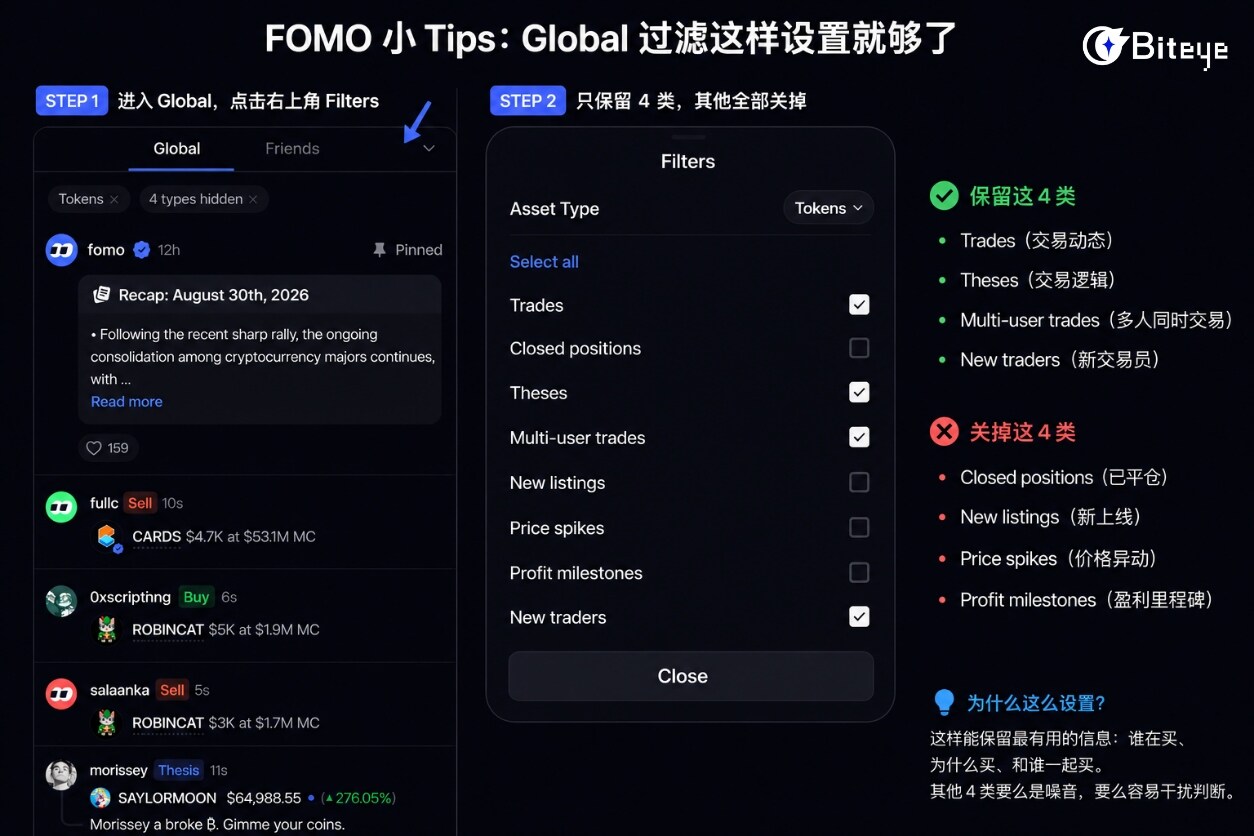
The editor currently only keeps 4 categories:
✅ Trades: Trading activity
✅ Theses: Trading viewpoints / investment logic
✅ Multi-user trades: Trades with multiple participants at once
✅ New traders: Newly appearing traders
All other categories—Closed positions, New listings, Price spikes, Profit milestones—are turned off.
For the editor, "what others are buying" matters more than "when they're selling"; mixing buy and sell signals together just creates noise. I don't pay attention to price spikes either—you buy flat, not vertical; once it's already pumped, there's little point in looking.
2. Treat Clans as a "tracker for foreign cabals"
Clans is FOMO's new team-based feature: a group of traders forms a Clan, ranked by the team's overall PnL.

The editor doesn't blindly follow the leaderboard but instead uses it to find collective consensus: first check the 7D / 30D rankings, then go into Clans and pick 1–2 stable core members who regularly post theses. Especially when a coin hasn't pumped much yet but 2–3 core members have been steadily buying in, that's a signal worth paying close attention to.
Two additional points to note:
First, don't just look at a Clan's PnL ranking.
Some teams may only be carried by one or two large positions, or even a single lucky trade. Click into the members and check their last 20 trades to confirm whether they're consistently profitable.
Second, don't chase just because you see a notification.
FOMO's signals reach you with a delay. First compare their entry price with the current price; if it's already pumped 10%-20%, this is essentially not the same trade anymore.
3. The five Tabs: how do you find coins worth buying?
The editor considers these five Tabs the most useful feature, but many people don't really understand when to look at each one.
Crypto, Trending, Most Held, Graduated, and Gainers essentially correspond to five different market states.
-Crypto: For majors like SOL, ETH.
-Trending: For the day's narrative. Whatever coins suddenly see heavy trading volume basically shows what the market is speculating on today—good for finding the hot topic of the day.
-Most Held: For holding consensus—useful for judging which coins people are willing to hold onto after buying.
-Graduated: For new opportunities. This specifically shows new coins that just graduated from the internal market and entered public trading—a radar for earlier-stage new coins than Trending.
-Gainers: For the gainers list, useful for confirming strength.
The editor's typical order of use is:
Graduated to find new coins → Trending to gauge heat → Most Held to check if people are willing to hold → Gainers to see if it's already up too much.
🌟 Final Thoughts
After using it, the editor believes the biggest advantage of Social Trading isn't "copy trading," but lowering the cost of finding Alpha: previously you'd find the coin first, then research who's buying; now you can find trustworthy people first, then see what they're buying.
But don't treat it as a "copy homework" tool either. Signals are delayed, PnL can be distorted, and small caps carry slippage and liquidity risks.
So FOMO is better suited as an "Alpha radar"—at the end of the day, whether to buy is still your own call.