

Security Class 02 | Gate & OneKey: How to Prevent Malicious Wallet Approvals and Address Poisoning

Half a year ago, you clicked "Confirm" on some page to claim an airdrop. The pop-up showed a string of unreadable characters, and you signed. The campaign ended, you closed the webpage, later uninstalled that app, and even switched computers once.
Today, the USDT in your wallet is gone. Your private key wasn't leaked, your seed phrase has been locked in a drawer the whole time, and you never told anyone your password. So here's the question: at which step did things go wrong?
This is the second installment of Gate's special series, "Gate Security Course." We've invited open-source hardware wallet brand OneKey and the Gate security team to discuss the security issues of on-chain wallet approvals and address poisoning, from the perspectives of both wallets and trading platforms.
Guest Introductions
OneKey: Founded in 2019, OneKey is one of the world's best-known open-source hardware cold wallet and app wallet brands, upholding a hardcore fully open-source philosophy from day one. Its core software and hardware code is fully open-sourced on GitHub for community review, and has passed security audits by SlowMist and Offside Labs. It has earned the trust of billions in assets, as well as funding support and adoption from top-tier institutions.
OneKey App covers desktop, mobile, and browser extension, and can be used independently as a software wallet or connected to a OneKey hardware wallet. Through features such as secure chips, offline signing, transaction parsing, risk alerts, and plaintext signing, it helps users manage multi-chain assets without handing over their private keys and seed phrases.
Gate Security Team: Hello everyone, this is the second installment of "Gate Security Course." The Gate security department is responsible for building the platform's account, trading, and asset security systems, and also handles user appeals and assistance requests regarding abnormal accounts on an ongoing basis.
Founded in 2013, Gate is the industry's first trading platform to introduce 100% proof of reserves and currently serves over 60 million users worldwide. For us, security isn't an add-on feature — it's the prerequisite for this business to exist at all. Through the "Gate Security Course" series, we hope to clearly explain the common mechanisms behind the real risks users may encounter.
Q1. Why can on-chain wallets move assets without obtaining the private key?
OneKey: The private key determines signing authority, while an approval grants a certain operational permission to a contract or address. Many approvals are well-intentioned, allowing users to save Gas and reduce repeated on-chain operations, but this also provides convenience for attackers.
An approval you signed previously is equivalent to allowing someone else to use those assets. Take ERC-20 tokens on Ethereum and other EVM networks as an example: when using swap, lending, and other applications, users often need to first do an Approve, that is, an approval. It allows a designated address or contract to use a certain amount of your token within a set limit. Once the approval takes effect, the other party can call transferFrom to move the tokens out, without needing your confirmation each time.
For example, you intend to swap 100 USDC, but you actually grant unlimited approval. After the transaction ends, the remaining approval may still be valid. If the approved party is an attacker, or the related contract later develops an exploitable vulnerability, the risk is no longer limited to that 100 USDC swap — it could affect more USDC in that address.
NFTs have a similar mechanism. setApprovalForAll typically allows the other party to manage all NFTs you hold under the same NFT contract, not just the one you're currently trying to sell.
So we advise users to confirm item by item before signing: the approved party, the asset, the amount, and the scope of validity. If even one item is unclear, don't sign. More importantly, use a wallet with signature parsing capability, and understand what you're signing.
Gate Security Team: OneKey explained the mechanism in great detail. What we'd like to add is mainly the cognitive bias on the user side, because it's the most fundamental source of this type of risk: many users interpret "signing" as "confirming."
In the traditional internet, clicking confirm once means agreeing to this one operation. The operation ends, and the permission ends too. But on-chain approval signatures don't work that way. Once you sign, the other party can move assets at any time, multiple times, without your confirmation again, within the approved limit. What the user signs isn't a single transaction — it's more like a long-term, valid letter of authorization.
There's an even more concealed difference here. Permit and Permit2 are off-chain signatures. They don't generate on-chain transactions and don't consume Gas, and the pop-up in the wallet often only shows a string of unreadable characters. Users intuitively think "an operation that costs nothing should carry little risk," but in reality, this type of signature is just as lethal as an on-chain approval.
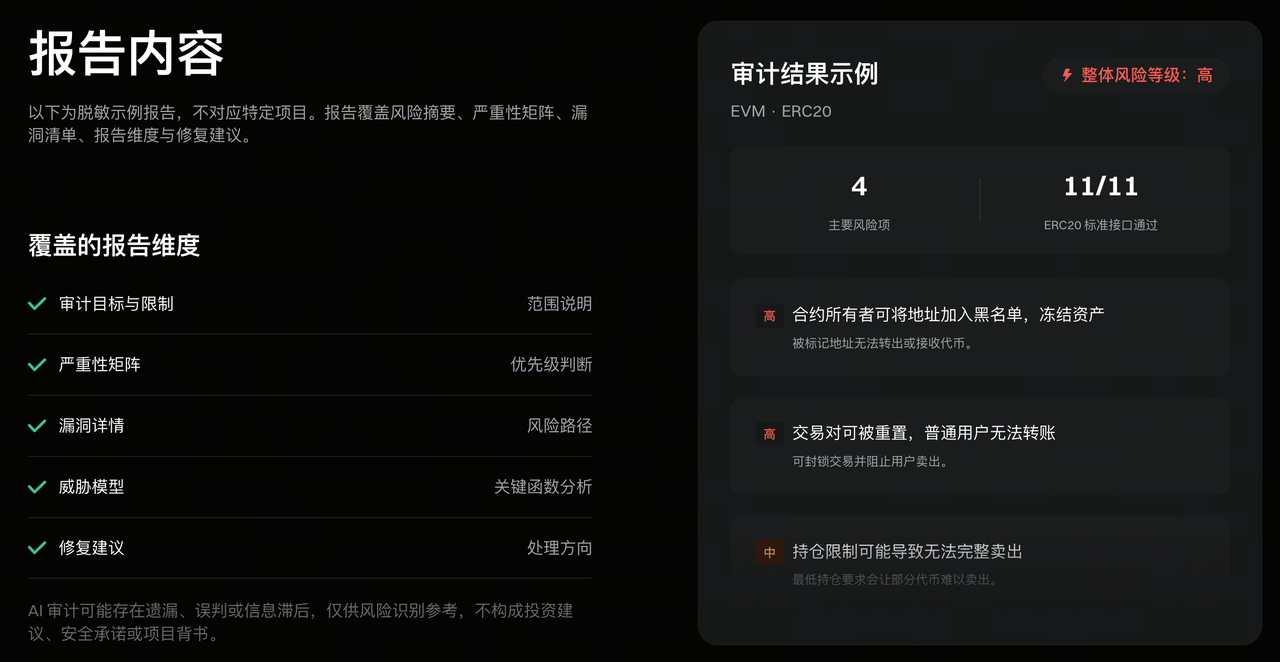
When it comes to Gate's tools specifically, don't rush to connect to unfamiliar contracts. You can first drop the contract address into Gate AI's contract audit and have it produce a structured risk report. Common pitfalls like owner privileges, blacklists, minting, and transfer taxes will be flagged first, covering more than 57 types of vulnerabilities. At the signing step, see clearly which token is being approved, how much, and for which project — support what-you-see-is-what-you-sign, and revoke approvals promptly after use.
Q2. What are the most common lures for ordinary users? When you see such pages, how do you decide whether to connect your wallet?
OneKey: Common lures usually revolve around two emotions: making you feel there's a bargain to be had, or making you worry that failing to act will cause a loss. The former includes airdrops, whitelists, free mints, and refund compensation; the latter includes account anomalies, security upgrades, token migrations, and assets about to be frozen. The packaging may differ, but they all ultimately lead you to a page that requires connecting your wallet, signing, or transferring funds.
We recommend users use wallets with webpage security detection capabilities. Official pages generally have certification; if there's no certification or there's a phishing alert, don't connect.
Connecting a wallet is usually just the starting point — the subsequent signature is what creates specific permissions. First verify the full domain and the purpose of the operation, then check the contract, method, approval amount, and Spender. If claiming a reward requires opening unlimited approval for unrelated assets, you should exit immediately. Unparseable hexadecimal data, unclear EIP-712 messages, and persistent urging are also worth being wary of.
When testing unfamiliar DApps, use an isolated small-balance wallet, and try not to connect long-term savings wallets to projects.
Gate Security Team: From the cases we've handled, the risk at the entry point is often higher than the page itself. That is, as we focused on in the first installment of "Gate Security Course," links can't be clicked carelessly — especially links from private messages, group chats, and search engine ad slots, which are the three most common sources of phishing sites. The search ad slot point deserves special emphasis: many people assume the first search result is the official site, but ad slots can be bought, and this is one of the most commonly used traffic-diversion methods for phishing sites.
Although connecting a wallet is itself a low-risk action, that doesn't mean it's completely zero-risk. As hackers' techniques have advanced, in many cases of on-chain wallet theft, there have already been numerous instances where users entered phishing clone sites, didn't sign anything, and simply had their assets stolen just by connecting their wallet. So users must be extremely cautious at the step of clicking a URL.
A relatively reliable approach is to bookmark your commonly used applications in the browser, and enter through the bookmark every time thereafter. This habit can avoid most traffic-diversion attacks and fake official pages, and it's the lowest-cost prevention for users. Here's another reminder: attackers often use trading platforms' credibility to endorse themselves. They'll say "Gate has already listed this token" or "Gate is conducting an airdrop," using the platform's name to make a worthless project seem credible.
In such cases, the standard for judgment is actually very simple: all of Gate's official announcements are synchronized on the official announcements page. If a piece of news only appears on some social account and can't be found on the official site, it's very likely problematic. This judgment requires no technical knowledge, and users don't need to be able to read contracts.
If users receive emails, text messages, or private messages claiming to be from Gate, they can check on the official verification channel whether this domain or contact email is ours. This action takes only a dozen seconds. In addition, users can set their own anti-phishing code in their account. Once set, all emails sent by Gate will include this string of characters. Users who haven't set it yet are advised to go to security settings and enable it first.
Q3. How does address poisoning trick users into sending funds to the wrong address? What checks must be done before large transfers?
OneKey: It exploits a very common habit: copying an address from transaction history and only glancing at the beginning and end.
Based on the target's frequently used addresses, attackers batch-generate addresses with similar beginnings and endings, then send zero-amount or extremely small token amounts to make the fake address appear in the transaction history. Many people only check the beginning and end when transferring, or directly copy the "most recent address," and the money goes to the attacker.
The most important protective action is not to treat transaction history as a trusted address book for recipients. When depositing to an exchange, obtain the address from the already-verified official deposit page; when paying others, reconfirm through trusted channels. The source of the address must be reliable, and after pasting, you should verify the full characters, not just the first and last few.
For large transfers, it's recommended to do a small test first and have the recipient confirm receipt, or verify it in your own target account. When making the formal transfer, you should still verify the full address again. A successful first test doesn't mean you can skip checks on the second copy, paste, and confirmation. Frequently used addresses can be saved to the address book or whitelist after verification.
App wallets such as OneKey come with relevant detection. For erroneous copies, they generally alert "this is your first transfer" or "similar address warning," helping users quickly discover that this is a poisoning attempt.
Gate Security Team: This question relates to trading platforms more directly than many people think, because deposits and withdrawals are precisely the two scenarios where address poisoning occurs most frequently.
Let's start with deposits. We'd like to emphasize once more the principle OneKey mentioned: deposit addresses must always be freshly obtained from the platform's official deposit page, and never copied from the history of any social software. Also be sure to be wary of whether the keyboard software installed on your phone has security issues — there are many cases where keyboard software problems silently replaced users' transfer and deposit addresses, leading to stolen funds.
On the withdrawal side, Gate has two things we suggest you start using directly: first, the address book — save frequently used addresses after verification, and select from the book thereafter, reducing one instance of slip-of-the-hand pasting; second, API withdrawals can only be sent to addresses already in the address book. In programmatic scenarios no one is watching the screen, so this restriction is equivalent to forcing one more manual confirmation. Newly added withdrawal addresses also have a 24-to-48-hour cooling-off period, which gives an extra window to discover errors when a poisoned address is pasted incorrectly.
Q4. Why should wallet approvals be reviewed regularly? What should be noted when revoking approvals?
OneKey: Because an operation ending doesn't necessarily mean the approval ends. Disconnecting the wallet, closing the website, or even uninstalling the wallet won't automatically revoke an on-chain approval that has already taken effect. If you granted unlimited approval to a contract, it may still retain the relevant permissions even after you stop using the project. If the contract later develops an exploitable vulnerability, idle approvals can also put assets in your wallet at risk.
When reviewing, you don't have to go through all records before acting. You can handle the most important parts first: unlimited approvals for high-value assets, global NFT approvals, unrecognized approved parties, and applications you no longer use. A project may once have been trustworthy, but that doesn't mean you need to retain its asset usage permissions forever.
When revoking, use a verified wallet entry point or approval management tool to confirm the account, network, token, and approved party. Revocation usually requires an on-chain transaction and a network fee. After submission, you should confirm the transaction succeeded and the permissions have been updated. It can stop the relevant permissions from being used further, but it cannot return assets that have already been moved out.
There's another point that's easily overlooked: dangerous messages that have been signed but not yet put on-chain may not appear in ordinary approval lists. Such cases need to be handled according to the specific protocol to invalidate or cancel the signature, and you can't just check whether there are unfamiliar approvals in the list. The deadline in some Permit signatures only limits the latest time the signature can be submitted; it doesn't mean the approval will expire at the same time once it takes effect.
Gate Security Team: Regular "check-ups" should be done often, and this also holds true for trading platform accounts. So we'd like to extend the idea of "regular review" from on-chain to the off-chain account side, and suggest users do a complete permission check-up.
First, security logs. Accounts record the history of logins and key operations, including login time, location, device, and changes to security settings. When you suspect something is wrong, this is the most direct entry point for self-checking, and also one of the most valuable materials for assistance investigations.
Second, API Keys. This is the most easily forgotten item. Many users created an API Key at some point when trying a quantitative strategy, integrating a third-party tool, or using a copy-trading service, and after using it, neither deleted it nor went back to check its permission scope. The nature of an API Key is very similar to an on-chain approval: it was created for a specific purpose, but it doesn't expire on its own. It's recommended to regularly check existing Keys, delete ones no longer in use, and confirm whether the permissions of the remaining ones exceed actual needs.
Third, the security settings themselves. Is your phone number still in use, has your email changed, and can the bound verification methods still be used normally. These usually don't affect usage, but when you really need to recover your account or handle an emergency, any one of them failing will make things very troublesome.
Q5. If you discover you may have signed a dangerous approval, or assets are being transferred away right now, what is the correct order of handling?
OneKey: First reduce the possibility of further losses, then investigate the full sequence of events; evidence can be preserved in parallel, and don't let organizing materials delay stopping the loss.
Immediately stop operating on the suspicious page, and don't sign any "fix," "verify," or "revoke" requests it provides. If you've clearly identified a malicious approval, revoke it as soon as possible through a trusted entry point; if the scope of risk is unclear, or assets are still flowing out, prioritize protecting remaining assets, and migrate assets that can still be safely transferred to a secure wallet on a trusted device.
As long as the seed phrase or private key may have been leaked, the migration target should use a brand-new seed phrase. Changing the wallet password, reinstalling the App, or adding a new account under the same seed phrase cannot eliminate the risk of the original key being leaked. The new wallet should be created on a trusted device, and the old wallet should no longer receive assets.
If the ETH or other network fee assets you top up are also immediately transferred away, don't repeatedly deposit and try again. This may involve an automatic sweeper program, and regular transfers and revocations may not be completed in time. You should seek assistance from a trusted security team through official channels.
At the same time, save the victim address, relevant transaction hashes, chain, token, amount, and time of occurrence, then add the suspicious URL, signature content, screenshots, and chat records. Contact the wallet and the CEX platform that may receive the funds through official channels, and report to local law enforcement. Compared with saying "Help, my wallet was hacked," these materials are more conducive to the receiving party carrying out verification. If materials are incomplete, you can first report the key facts and supplement them later.
Another thing worth noting: other hackers often specifically target users in this situation to cause "secondary harm." Many people, eager to recover losses, believe the "100% recovery" claims in other hackers' private messages, and are scammed into continuing to pay so-called unfreezing fees or handing over their seed phrases.
Gate Security Team: This type of scenario differs from the account theft discussed in the previous installment: if the attacker holds an approval the user signed for them, then changing the password and reinstalling the app won't stop them from continuing to move assets out, because that approval has nothing to do with the on-chain wallet password. So the first step should be to revoke the approval and transfer the remaining assets, not change the password.
When an asset transfer occurs on-chain, if that transfer is a completely valid call